#Mobile (2026)

kallax

A vinyl DJ companion built for crates, not clouds

Mobile app for vinyl DJs. Sync your Discogs collection, track BPMs, build playlists, run live sets. Offline-first, local storage, no subscriptions. Designed for dark booths, professionals, and collectors who rely on manual curation.

TimelineDecember 2025 – January 2026 (6 weeks)
RoleSolo: design, development, brand, distribution
Tech stack
React NativeFigmaExpoSQLiteDiscogs APIGetSongBPM API
Kallax app interface showing collection grid with bold yellow accents against a dark background

Mission

Vinyl DJs work offline, own physical objects, and dig through crates. Software must respect that.

I DJ with vinyl. Every time I prepared for a set, I juggled three disconnected tools: 1. Discogs for my collection metadata, 2. manual notes and stickies for tracking BPMs, and 3. my own memory for records and tracks. I asked myself many times: "Why is there not one tool that understands how vinyl DJs actually work?" Not streaming DJs scrolling through infinite playlists or amateurs without real crowd pressure. Vinyl collectors who perform live, often without internet, in poorly lit booths, surrounded by dozens of physical records they need to locate quickly.

The name came naturally: Kallax. After the ever-present IKEA shelving unit that has become the unofficial furniture of record collectors worldwide. Modular, unpretentious, functional. The objective was clear:

  • Build a companion app that works the way vinyl DJs do. Sync collection data from Discogs, fetch BPM information where it exists, and make manual entry effortless where it doesn't.
  • Organize playlists offline and provide a live reference mode that stays out of your way during a set.
  • No cloud dependency, no subscription model, no pretending perfect metadata exists for every obscure pressing.

Context

The tools available to vinyl DJs exist in isolated silos. Discogs serves as the ubiquitous repository for collection metadata, but offers no DJ functionality. Mainstream software solutions like Rekordbox are made to work with digital files, not physical objects. Streaming platforms become irrelevant the moment you are standing in front of a crate, and then there is the BPM problem... Unlike digital DJs who have tempo metadata embedded in their files, vinyl DJs need to know or feel what speed their tracks are. Some pay services to analyze tracks they do not even own digitally. Others manually tap out tempos on calculators, but most just guess and adjust by ear.

The opportunity was to design a mobile app that brings these disconnected pieces together. Sync with Discogs to import your collection. Fetch BPM data where APIs can provide it. Make manual entry feel natural rather than punitive. Offer a live mode that functions as passive reference during sets. No cloud lock-in, no monthly subscription, no illusion that perfect data exists for every record pressed in 1974. The constraint that shaped everything was to build it fast and alone, making every design choice serve the person standing in a dark booth trying to remember which crate holds their copy of that specific pressing.

Vinyl DJs and record collectors who catalog on Discogs, perform at venues, clubs, radio shows, private parties and value offline-first tools. We all appreciate when software understands the craft rather than trying to replace it.

Creation

Five principles emerged while designing Kallax. Each one responds to how vinyl DJs actually work—rather than how software typically imagines they should.

Honor the ritual. Digging through records is part of the craft. The muscle memory of flipping through crates matters.

Design for the booth. DJ booths are dark spaces, often with colored stage lighting. The interface had to work there.

Respect ownership. No login required. No cloud storage. No subscription model.

Accept reality. The GetSongBPM API returns tempo data for roughly 67% of tracks. So I built excellent manual entry instead of chasing perfect automation.

Stay out of the way. Three tabs, three concepts. No nested menus to hunt through under pressure.

Collection Management (Shelf Tab)

Connect your Discogs account via OAuth and sync your complete collection: releases, tracks, artists, album art.

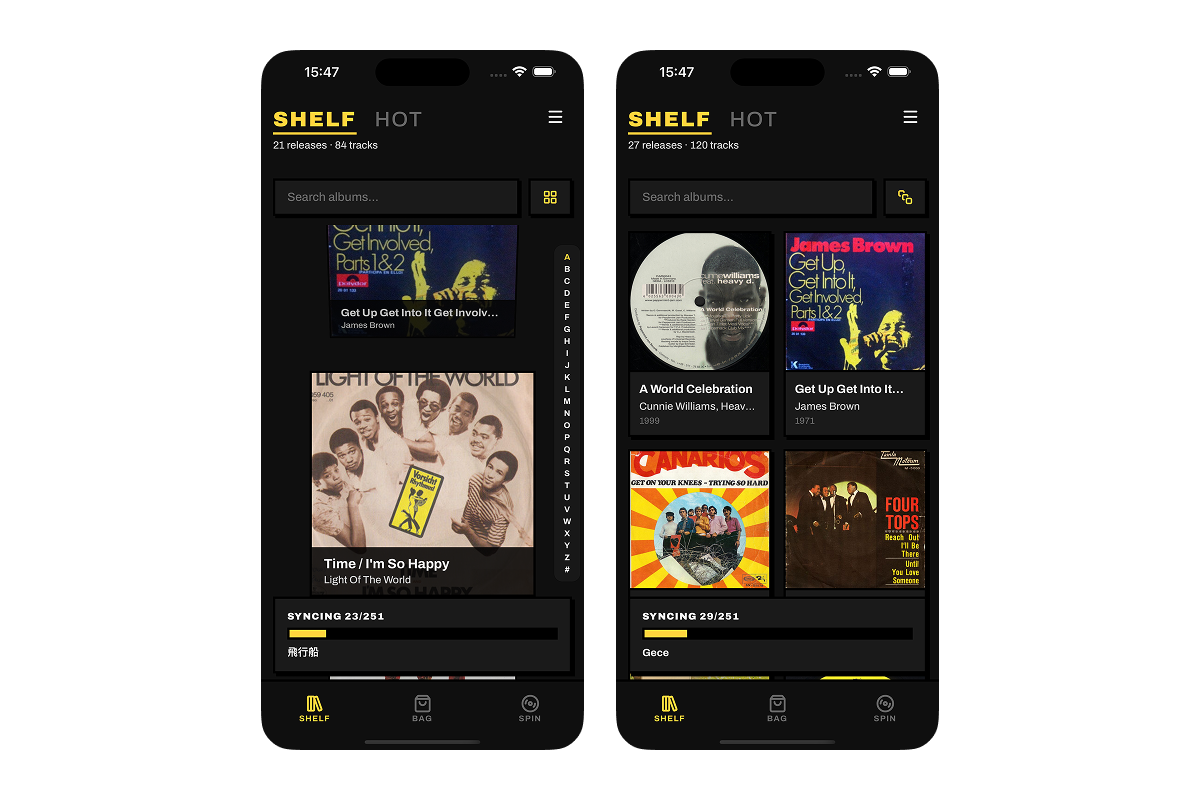
Two browse modes serve different needs. Grid view for efficient scanning. Cover-flow for the ritual of digging through crates one album at a time. Real-time search filters as you type.

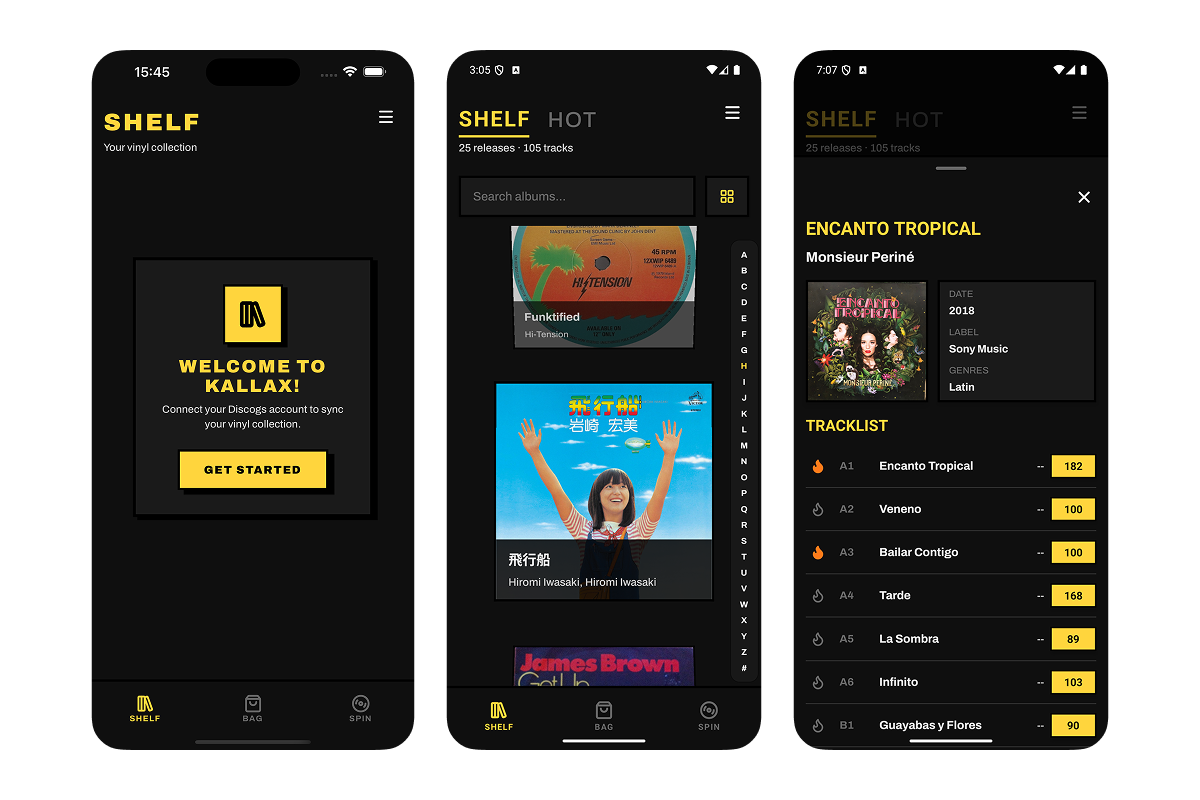
Toggle between your full collection (SHELF) and favorited tracks (HOT). Tap any album to see the full tracklist with vinyl-specific positioning (A1, B2, etc.), track durations, and BPM badges.

Kallax onboarding welcome screen, collection grid view, and album detail with tracklist
Onboarding to album detail: welcome modal prompts Discogs connection, grid view shows synced collection, tapping an album reveals full tracklist with vinyl positioning and BPM badges.

BPM Detection & Manual Entry

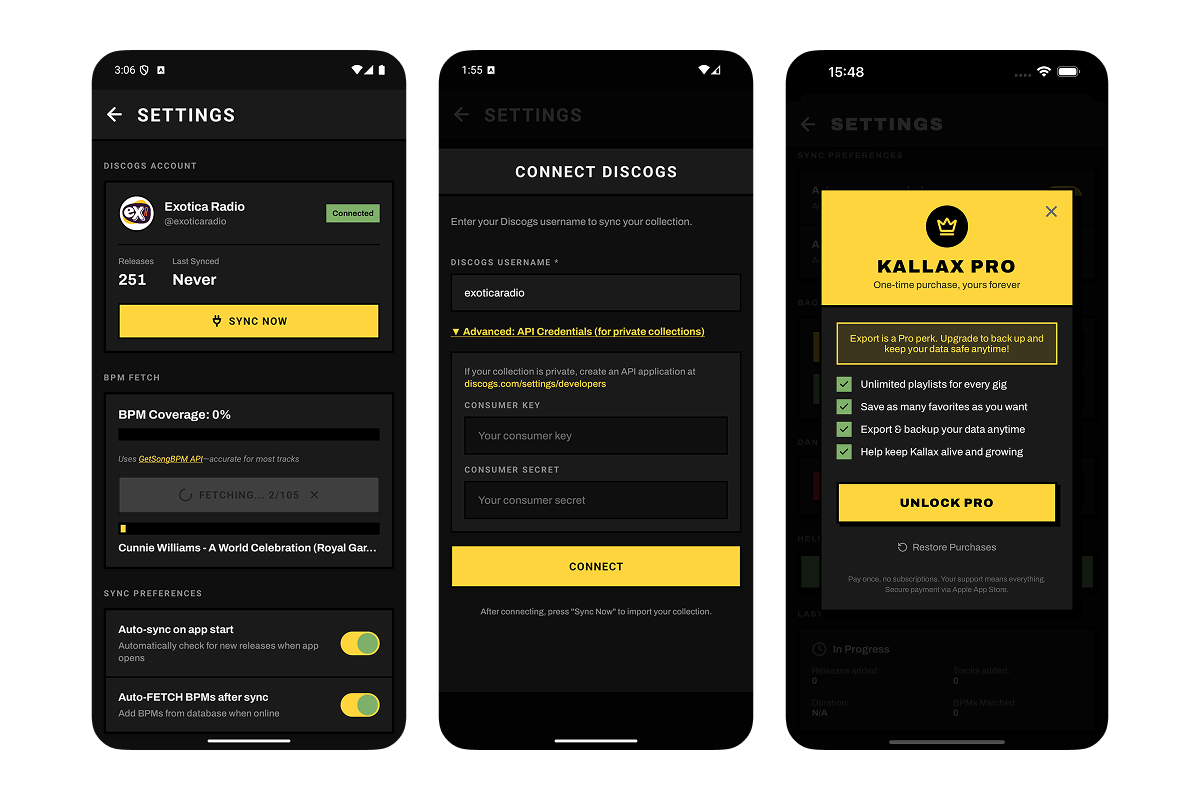
After syncing, fetch BPM data from GetSongBPM API. A progress bar shows real-time status as it processes your library.

For tracks without data, or where the API got it wrong, tap the BPM badge to open a tap-tempo interface. Four taps gives you your tempo. Done.

Settings displays your BPM coverage percentage. No gamification. No pressure to hit 100%. Just honest reporting of what is verified versus what needs manual input.

Settings screen showing Discogs connection, BPM fetch progress, and sync preferences
Settings hub: Discogs account connection, real-time BPM fetch progress with coverage percentage, and sync preferences for auto-updates.

Playlist Management (Bag Tab)

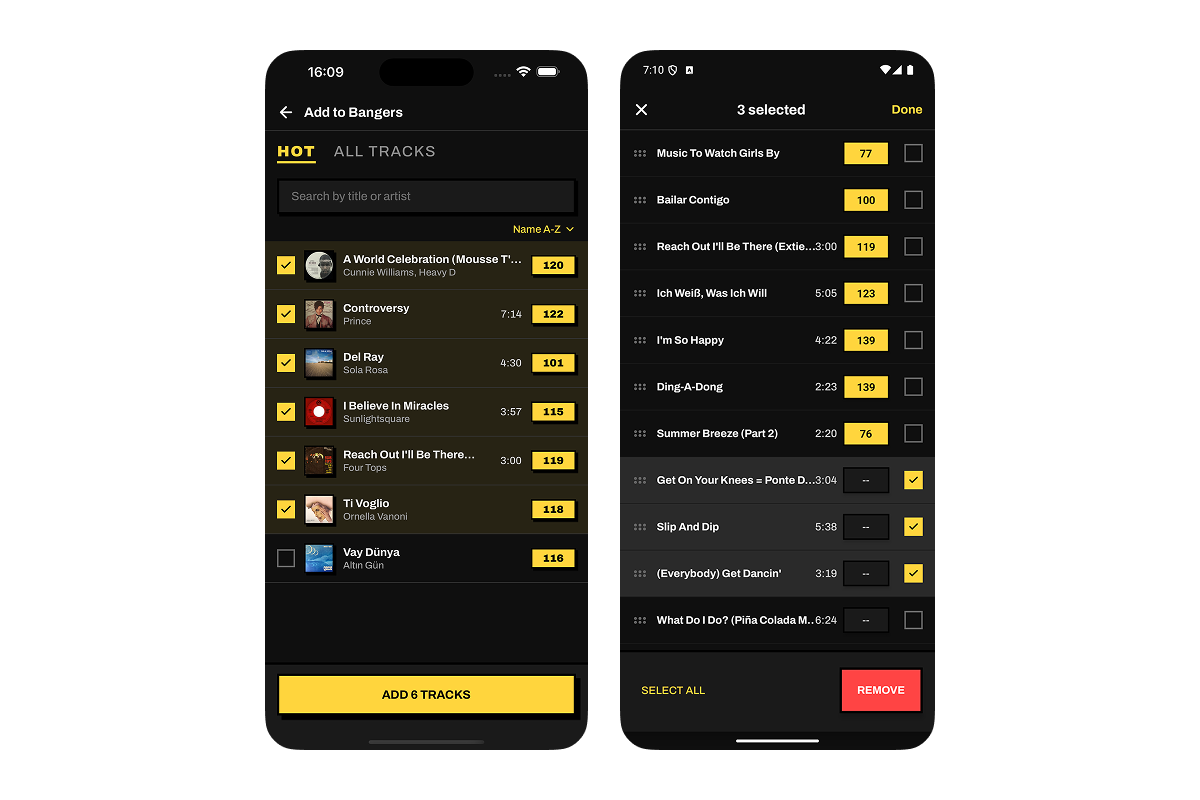
Create playlists using tracks from your collection or hot tracks.

Drag-and-drop to reorder in manual mode. Or sort by BPM (ascending or descending) or alphabetically.

If a playlist exceeds 60 tracks, you will see a heavy bag warning. A practical reminder that carrying that many records to a gig is physically exhausting.

Playlists are local. They export with your backup. You own them completely.

Kallax playlist detail view with numbered track positions and BPM badges
Manual sort mode enables drag-and-drop reordering. Tracks without BPM data display double dash as honest indicator rather than broken state.

Live Mode (Spin Tab)

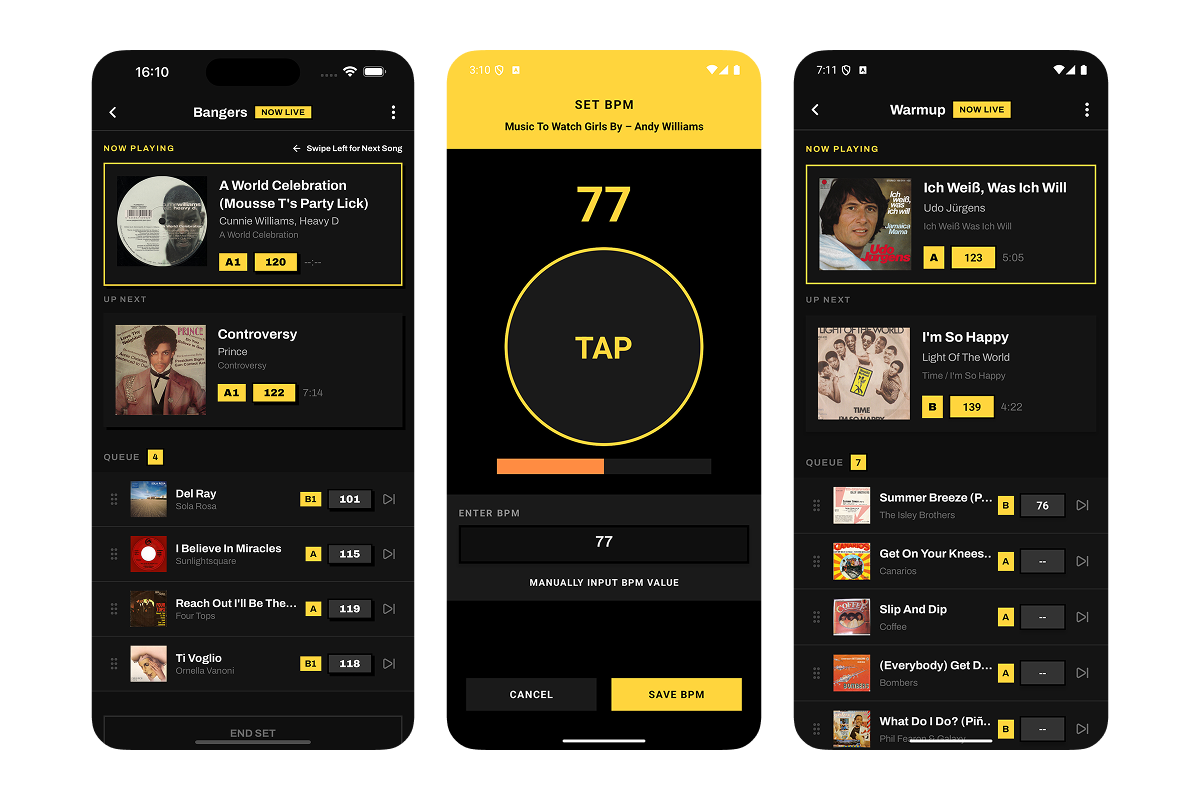
Select a playlist, start a live session. The Now Playing card dominates the screen. Large album art, track title, artist, BPM clearly visible. Swipe left for next track, swipe right for previous. The queue scrolls below showing what is coming up. Skip to any track if you need to adjust on the fly. Edit BPMs mid-set if you discover the data was wrong. The screen stays awake automatically. Live Mode does not try to control your mixer or suggest what to play next. It assumes you know what you are doing and simply organizes the information you need to reference quickly.

Kallax Live Mode showing Now Playing track, tap-tempo BPM interface, and queue view
Live Mode with tap-tempo fallback: Now Playing card shows current track with BPM, tap interface for manual entry when needed, queue shows what is coming up next.

Marketing Website

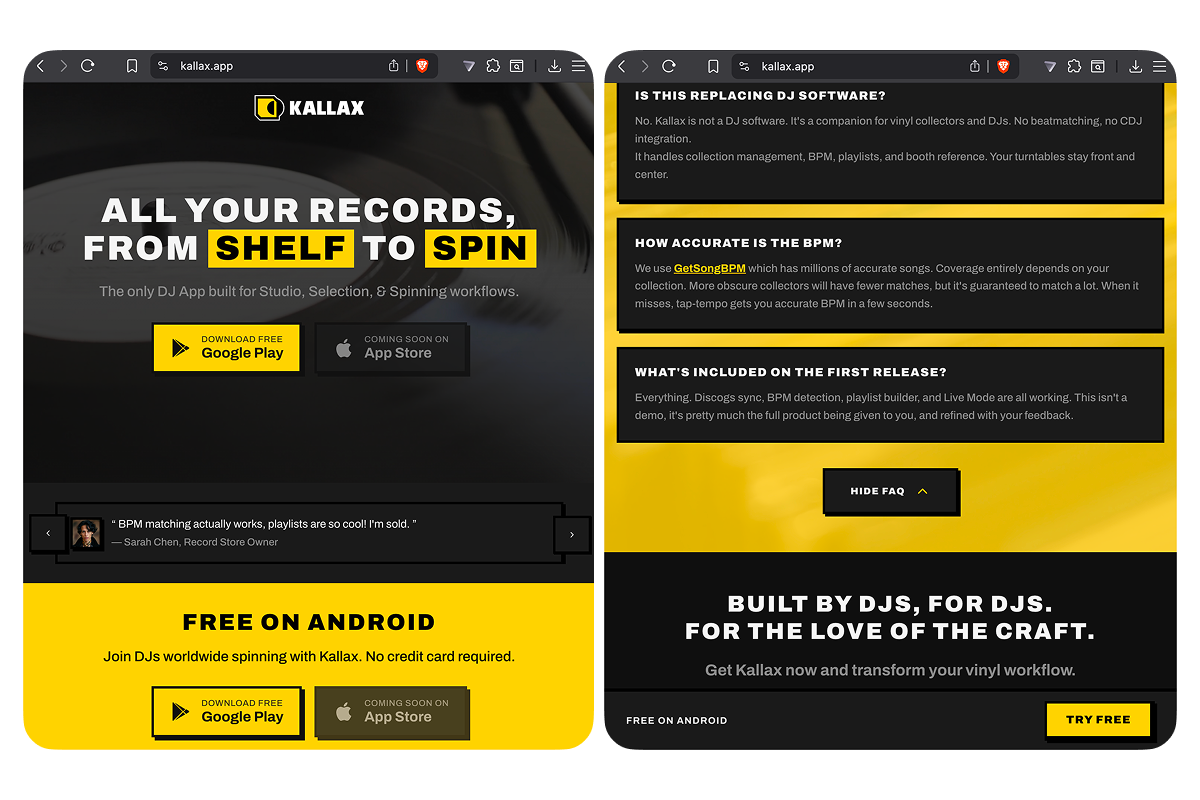
Built kallax.app to match the app aesthetic. Single page, no trackers, no analytics, direct download links to both stores. The site had to communicate what the app does in under 10 seconds for visitors who found it through search.

Kallax marketing website showing app screenshots and store download badges
Marketing site extends the neo-brutalist system. Yellow accents, square cards, immediate download buttons. No fluff.
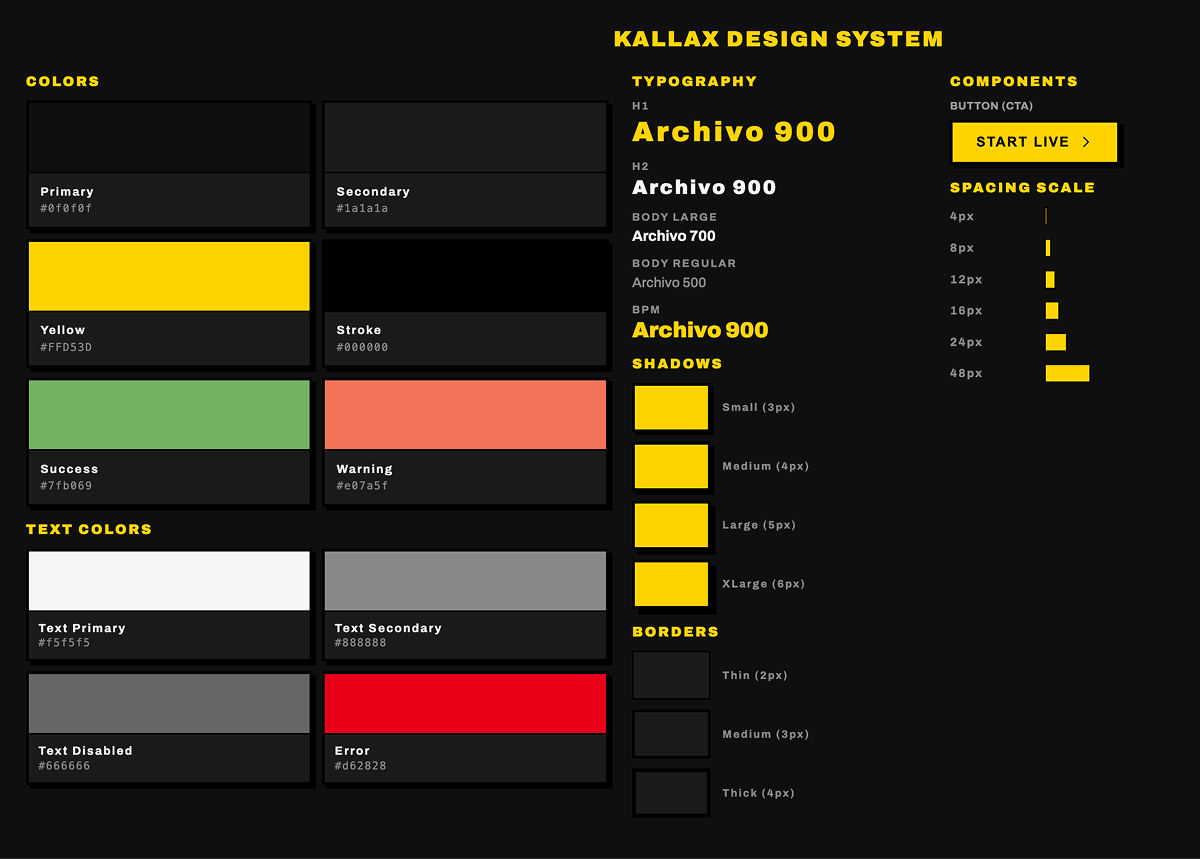
Kallax design system showing color palette, typography, and border examples
Neo-brutalist visual system. #FFD53D yellow for booth visibility, 3-4px borders, hard drop shadows, uppercase labels in Archivo typeface. Squares contrast with circular records.
Side-by-side comparison of grid view and cover-flow digging mode
Two browse modes honor different behaviors. Grid view for efficient scanning, cover-flow digging mode for the ritual of flipping through crates one album at a time.

Craft

  • Yellow (#FFD53D) over blue, green, or white. It sits second in the visible spectrum for brightness but reads warmer than blue light, which causes more eye strain in dark spaces. Tested in actual DJ booth conditions with dim red house lighting and complete darkness.
  • Squares and hard edges throughout. Records are circular, turntables are circular, vinyl culture is defined by round geometry. Square cards with hard borders create neutral frames that present any album cover without the interface competing visually. Neo-brutalism signals directness. This tool does not pretend to be smoother than reality.
  • Three tabs instead of deeper navigation. DJs do not have time to hunt through nested menus when they are thirty seconds from needing their next record. Shelf, Bag, Spin. Three words, three concepts. This constraint forced clarity everywhere else.
  • Accept 67% BPM coverage instead of chasing perfect automation. I could have integrated multiple APIs, built server-side audio analysis, used algorithmic estimates. The design decision. Build excellent manual entry rather than chase unreliable automation. The tap-tempo interface is fast, tactile, gives DJs direct control.
  • Skip authentication in the MVP. Building OAuth flows and backend infrastructure would have delayed launch by weeks. But the choice became philosophical. DJs own physical records, they should own their data with the same certainty. Local-first architecture means the app works offline by default, never phones home.

First sketches in December 2025. First commit on Christmas Eve. Six weeks later it was live on both stores.

Building alone meant owning every decision: design, development, API integration, database, deployment, marketing, app store submissions. That kind of isolation forces clarity. If I could not explain why a feature mattered in one sentence, it did not matter enough to build.

So I cut. I cut a lot :) Collaborative playlists were too complex for the timeline. Spotify preview was nice-to-have, not essential. Genre and year filtering could wait until usage proved demand. What remained was the tightest possible loop: sync your collection, build a playlist, run a live set.

Solo building also meant accepting strategic imperfection. Six weeks of "good enough to be useful" beats "theoretically perfect" that never launches.

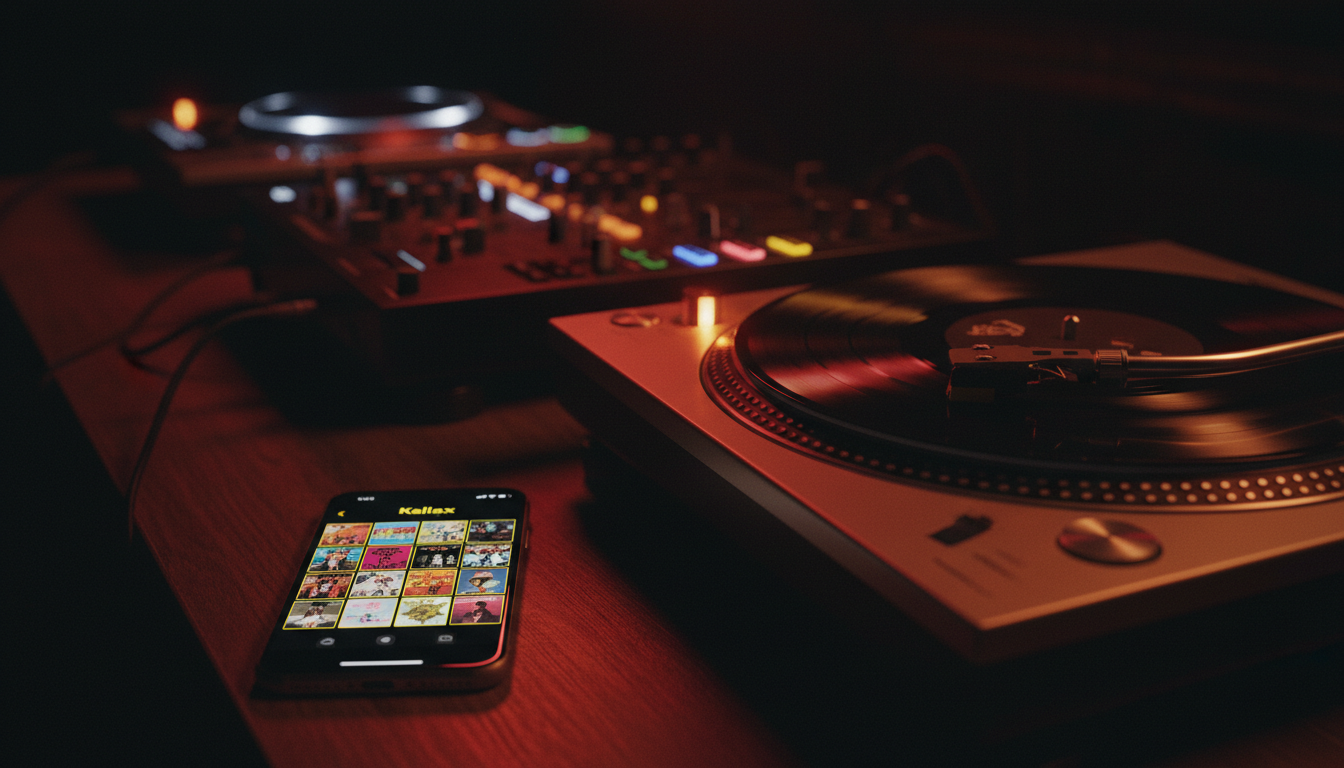
Kallax app displayed on phone next to turntables in a dark DJ booth environment
Designed for the environment where it is actually used. Dark DJ booths with colored lighting, surrounded by physical records, often without internet. Yellow stands out without causing glare.

Outcome

Kallax is now live on both the App Store and Google Play. In the weeks since launch, it has found its way onto 150+ devices. The measure of success for a tool like this is not download numbers or engagement metrics. It is trust. Do DJs trust Kallax when it matters? In the dark, without internet, in front of an audience? The professional DJs I know, friends who play clubs, radio shows, private events, are using it during live sets. No support questions about navigation or core functionality. Feature requests are refinements, not confusion about how things work. So far, yes.

  • Building everything solo from concept through distribution took focused work across the holiday period. Timeline possible because every decision optimized for shipping over perfection.
  • The privacy-first architecture that started as a velocity hack became the app's core identity. DJs appreciate that collection data never leaves their device, no monthly subscription, honest about what it can and cannot do.
  • The IKEA Kallax shelving reference lands immediately with vinyl collectors. It signals this was made by someone who understands the culture without needing to explain.

Reflection

Designing and building Kallax end-to-end taught me that constraints force honesty in product design. When you cannot hide behind "engineering will figure that out" or "we will improve that later". Every feature has to justify its existence immediately. The biggest shift in thinking for me, was designing for 67% coverage instead of 100% perfection. Most tools overpromise. Kallax does less, but what it does it does with transpaence and accuracy. That turned out to be more respectful to users than pretending certainty where none exists.

Open Questions

  • Will DJs pay for a tool that solves a real problem they have lived with for years, or has free software trained everyone to expect everything for nothing?
  • Can a solo-built app compete long-term with venture-backed competitors who can afford to lose money gaining market share?
  • Does the vinyl DJ community even want new software, or are they fundamentally satisfied with their current fragmented workflows?

Gallery

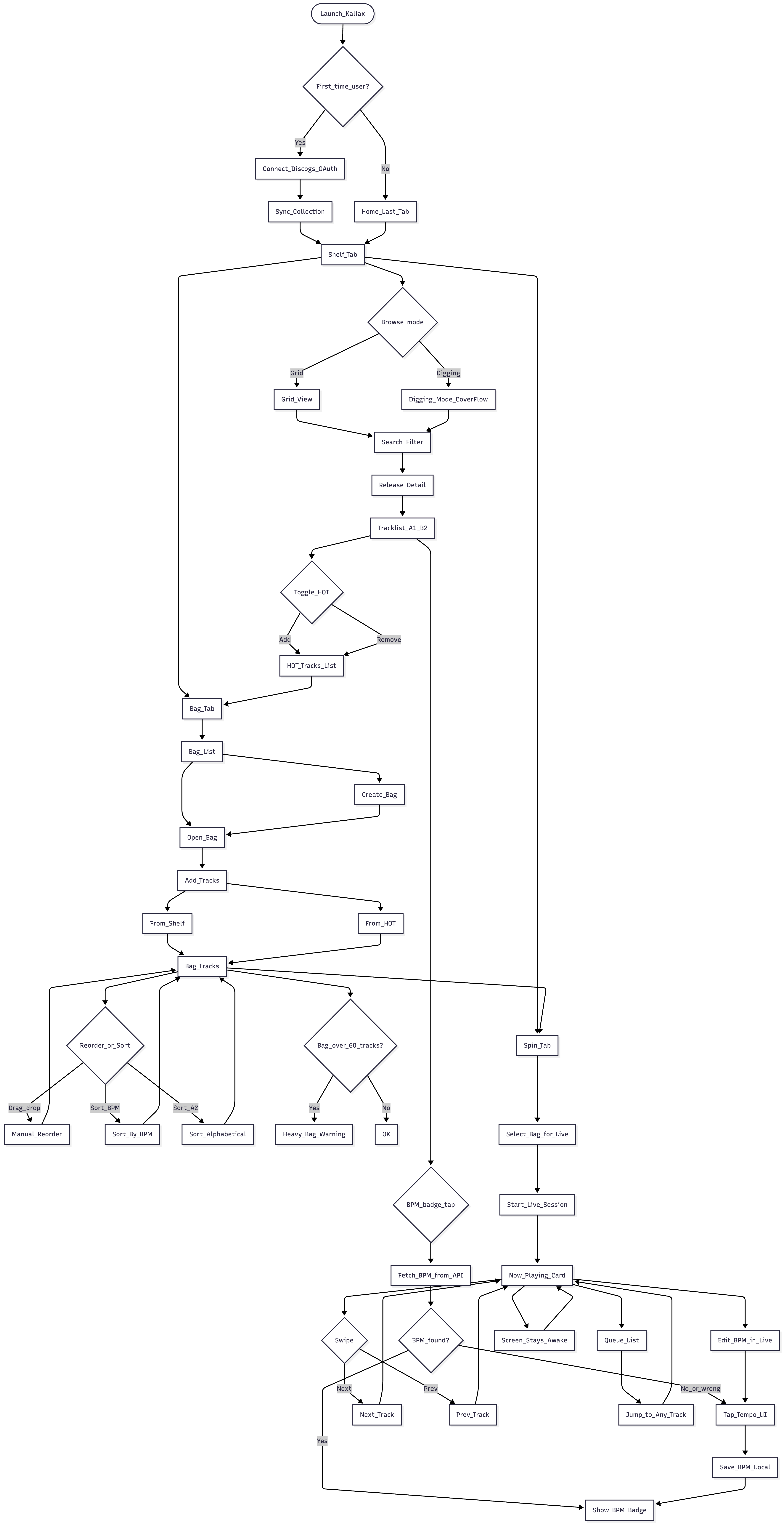
User flow diagrams showing first-time setup, creating playlists, starting live sets, and managing collection
User journey deliberately kept shallow. Three tabs, clear hierarchy. Collection to Playlists to Live Mode. No hidden features, no complex navigation patterns.
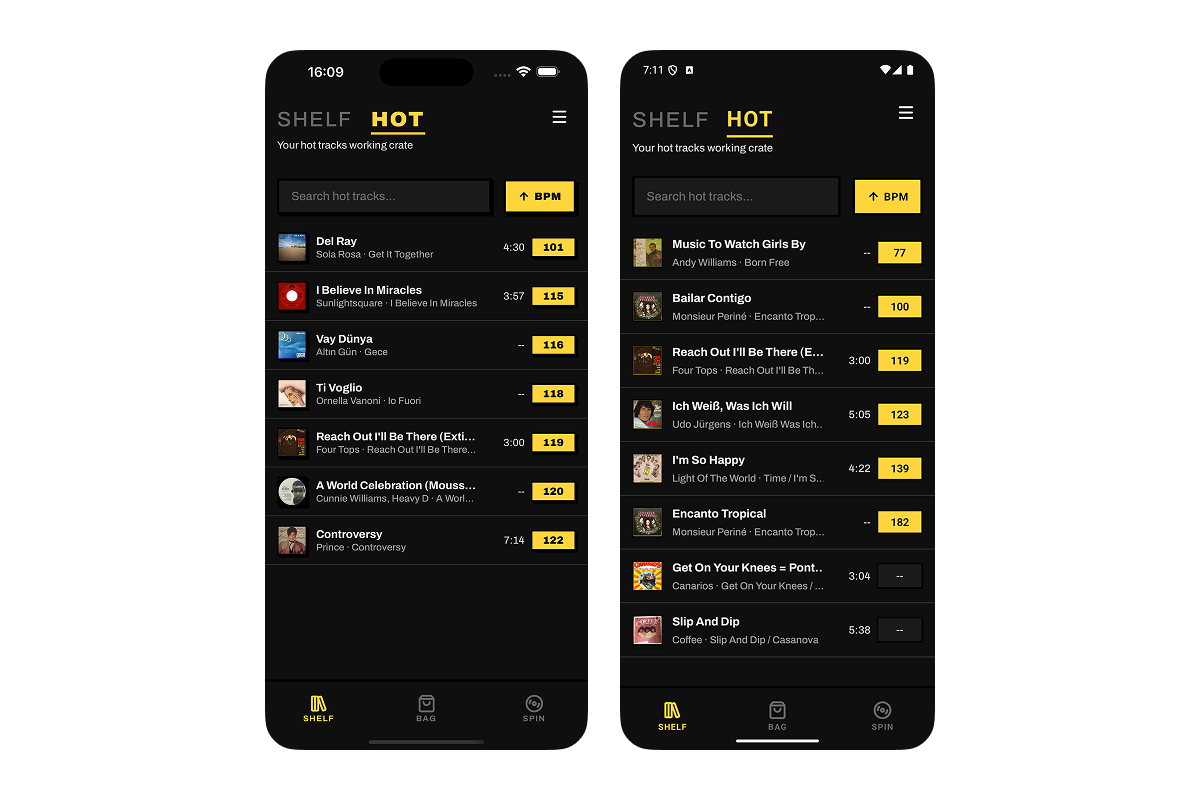
HOT tracks list showing favorited tracks with BPM sorting
HOT tab: your working crate of favorited tracks, sortable by BPM or alphabetically. The tracks you reach for most often, always at your fingertips.
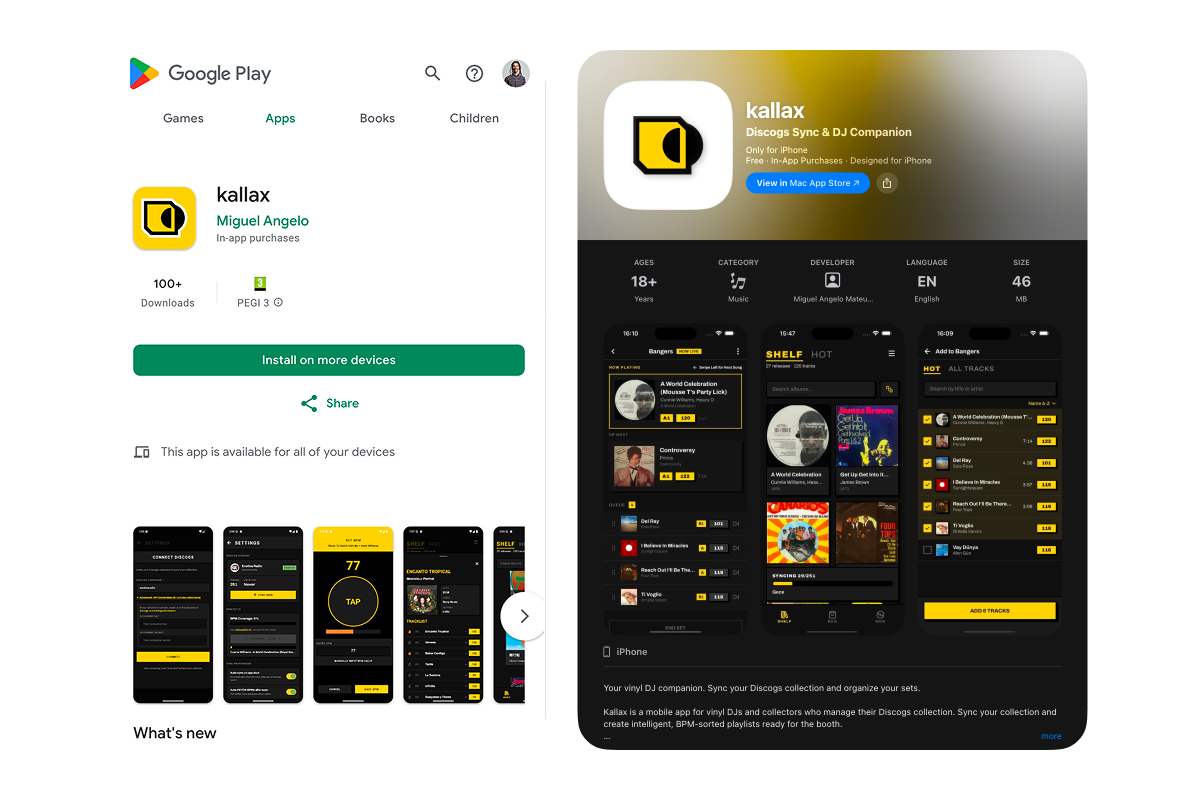
Google Play Store listing showing Kallax app page with screenshots
Live on both platforms. Six weeks from first commit to app store approval.